2016年12月4日 星期日

Computing and visualizing PCA in R__Cool_good

https://www.r-bloggers.com/computing-and-visualizing-pca-in-r/


Computing and visualizing PCA in R

November 28, 2013
By 
(This article was first published on Thiago G. Martins » R, and kindly contributed to R-bloggers)

Following my introduction to PCA, I will demonstrate how to apply and visualize PCA in R. There are many packages and functions that can apply PCA in R. In this post I will use the function prcomp from the stats package. I will also show how to visualize PCA in R using Base R graphics. However, my favorite visualization function for PCA is ggbiplot, which is implemented by Vince Q. Vu and available on github. Please, let me know if you have better ways to visualize PCA in R.
Computing the Principal Components (PC)
I will use the classical iris dataset for the demonstration. The data contain four continuous variables which corresponds to physical measures of flowers and a categorical variable describing the flowers’ species.
# Load data
data(iris)
head(iris, 3)

  Sepal.Length Sepal.Width Petal.Length Petal.Width Species
1          5.1         3.5          1.4         0.2  setosa
2          4.9         3.0          1.4         0.2  setosa
3          4.7         3.2          1.3         0.2  setosa
We will apply PCA to the four continuous variables and use the categorical variable to visualize the PCs later. Notice that in the following code we apply a log transformation to the continuous variables as suggested by [1] and set center and scale. equal to TRUE in the call to prcomp to standardize the variables prior to the application of PCA:
# log transform 
log.ir <- log(iris[, 1:4])
ir.species <- iris[, 5]

# apply PCA - scale. = TRUE is highly 
# advisable, but default is FALSE. 
ir.pca <- prcomp(log.ir,
                 center = TRUE,
                 scale. = TRUE) 
Since skewness and the magnitude of the variables influence the resulting PCs, it is good practice to apply skewness transformation, center and scale the variables prior to the application of PCA. In the example above, we applied a log transformation to the variables but we could have been more general and applied a Box and Cox transformation [2]. See at the end of this post how to perform all those transformations and then apply PCA with only one call to the preProcess function of the caret package.
Analyzing the results
The prcomp function returns an object of class prcomp, which have some methods available. The print method returns the standard deviation of each of the four PCs, and their rotation (or loadings), which are the coefficients of the linear combinations of the continuous variables.
# print method
print(ir.pca)

Standard deviations:
[1] 1.7124583 0.9523797 0.3647029 0.1656840

Rotation:
                    PC1         PC2        PC3         PC4
Sepal.Length  0.5038236 -0.45499872  0.7088547  0.19147575
Sepal.Width  -0.3023682 -0.88914419 -0.3311628 -0.09125405
Petal.Length  0.5767881 -0.03378802 -0.2192793 -0.78618732
Petal.Width   0.5674952 -0.03545628 -0.5829003  0.58044745
The plot method returns a plot of the variances (y-axis) associated with the PCs (x-axis). The Figure below is useful to decide how many PCs to retain for further analysis. In this simple case with only 4 PCs this is not a hard task and we can see that the first two PCs explain most of the variability in the data.
# plot method
plot(ir.pca, type = "l")
The summary method describe the importance of the PCs. The first row describe again the standard deviation associated with each PC. The second row shows the proportion of the variance in the data explained by each component while the third row describe the cumulative proportion of explained variance. We can see there that the first two PCs accounts for more than {95\%} of the variance of the data.
# summary method
summary(ir.pca)

Importance of components:
                          PC1    PC2     PC3     PC4
Standard deviation     1.7125 0.9524 0.36470 0.16568
Proportion of Variance 0.7331 0.2268 0.03325 0.00686
Cumulative Proportion  0.7331 0.9599 0.99314 1.00000
We can use the predict function if we observe new data and want to predict their PCs values. Just for illustration pretend the last two rows of the iris data has just arrived and we want to see what is their PCs values:
# Predict PCs
predict(ir.pca, 
        newdata=tail(log.ir, 2))

          PC1         PC2        PC3         PC4
149 1.0809930 -1.01155751 -0.7082289 -0.06811063
150 0.9712116 -0.06158655 -0.5008674 -0.12411524
The Figure below is a biplot generated by the function ggbiplot of the ggbiplot package available on github.
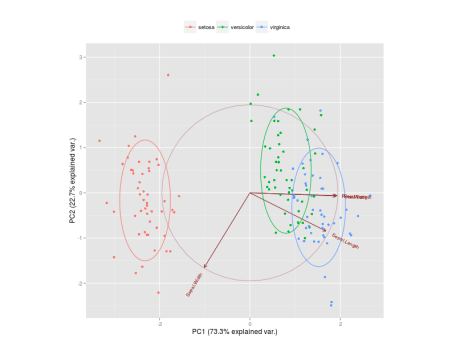
The code to generate this Figure is given by
library(devtools)
install_github("ggbiplot", "vqv")

library(ggbiplot)
g <- ggbiplot(ir.pca, obs.scale = 1, var.scale = 1, 
              groups = ir.species, ellipse = TRUE, 
              circle = TRUE)
g <- g + scale_color_discrete(name = '')
g <- g + theme(legend.direction = 'horizontal', 
               legend.position = 'top')
print(g)
It projects the data on the first two PCs. Other PCs can be chosen through the argument choices of the function. It colors each point according to the flowers’ species and draws a Normal contour line with ellipse.probprobability (default to {68\%}) for each group. More info about ggbiplot can be obtained by the usual ?ggbiplot. I think you will agree that the plot produced by ggbiplot is much better than the one produced by biplot(ir.pca)(Figure below).
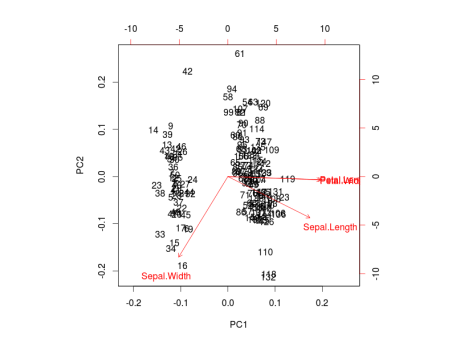
I also like to plot each variables coefficients inside a unit circle to get insight on a possible interpretation for PCs. Figure 4 was generated by this code available on gist.
PCA on caret package
As I mentioned before, it is possible to first apply a Box-Cox transformation to correct for skewness, center and scale each variable and then apply PCA in one call to the preProcess function of the caret package.
require(caret)
trans = preProcess(iris[,1:4], 
                   method=c("BoxCox", "center", 
                            "scale", "pca"))
PC = predict(trans, iris[,1:4])
By default, the function keeps only the PCs that are necessary to explain at least 95% of the variability in the data, but this can be changed through the argument thresh.
# Retained PCs
head(PC, 3)

        PC1        PC2
1 -2.303540 -0.4748260
2 -2.151310  0.6482903
3 -2.461341  0.3463921

# Loadings
trans$rotation

                    PC1         PC2
Sepal.Length  0.5202351 -0.38632246
Sepal.Width  -0.2720448 -0.92031253
Petal.Length  0.5775402 -0.04885509
Petal.Width   0.5672693 -0.03732262
See Unsupervised data pre-processing for predictive modeling for an introduction of the preProcess function.
References:
[1] Venables, W. N., Brian D. R. Modern applied statistics with S-PLUS. Springer-verlag. (Section 11.1)
[2] Box, G. and Cox, D. (1964). An analysis of transformations. Journal of the Royal Statistical Society. Series B (Methodological) 211-252

R_training_2016_1202_第三次上課

#################################################
# 第一章
# 描述性統計方法
#################################################
##  上課講義: biostat.tmu.edu.tw/R/20161202/#1
##  R圖形介面  install.packages("Rcmdr"), 只能用64bit 來執行!
## 讀取資料檔 ##
setwd("D:/R_work/")
babies = read.csv("babies.csv")
babies$parity = as.factor(babies$parity)
babies$smoke = as.factor(babies$smoke)

## 統計表 ##
t_smoke = table(babies$smoke, useNA="ifany")  # 次數 分配表
prop.table(t_smoke)  # 相對次數

## 集中量數 ##
mean(babies$bwt)  # 平均數
median(babies$gestation, na.rm=TRUE)  # 中位數
t_age = table(babies$age)
names(t_age[t_age %in% max(t_age)])  # 眾數

## 離勢量數 ##
var(babies$height, na.rm=TRUE)  # 變異數
var(babies[-c(3,7)], use="complete.obs")  #一起比較許多的 行
sd(babies$weight, na.rm=TRUE)  # 標準差
sd(babies$bwt, na.rm=TRUE) / mean(babies$bwt, na.rm=TRUE)  # 變異係數, 用來做比較時用,較不受資料本身影響
range(babies$gestation, na.rm=TRUE)  # 全距
min(babies$gestation, na.rm=TRUE)  # 最小值
max(babies$gestation, na.rm=TRUE)  # 最大值
IQR(babies$age, na.rm=TRUE)  # 內四分位距, 就是Q3-Q1, Q2 就是median
quantile(babies$age, na.rm=TRUE)  # 分位數


#################################################
# 第二章
# 基本繪圖功能
#################################################

## 高階繪圖函數 ##
plot(babies$bwt)
plot(babies[c("age", "height", "weight")])  ## 數值資料就是 scatter plote
plot(as.factor(babies$smoke))  ## factor 就變柱狀圖
plot(as.factor(babies$smoke), babies$bwt)  ## 有數值, 有類別 就盒?圖
plot(iris[,1], type="l")  # p, l, b, c, o, h, s, S, n
hist(babies$bwt, nclass=10, col="lightblue")  # 直方圖, !適合用連續變數資料
barplot(table(babies$smoke), col=2:3)  # 長條圖, 適合離散資料..要先做table!!
counts = table(babies$smoke, babies$parity)
barplot(counts, beside=TRUE, xlab="parity", legend=rownames(counts))
boxplot(iris[1:4])  # 盒鬚圖
boxplot(Sepal.Length ~ Species, data=iris, col=2:4, horizontal=TRUE)  # ~ formula, !!
pie(table(iris$Species))  # 圓餅圖
library(plotrix)
pie3D(table(iris$Species), theta=1, explode=0.1)

## 低階繪圖函數 ##
hist(iris[,2])
x = c(2.5, 3, 3.5)
y = c(18, 7, 12)
label = c("A", "B", "C")
points(x, y, pch=1:3)
lines(x, y, col=4)
text(x, y+2, labels=label)
legend(4, 35, legend=label, pch=1:3, lty=1, col=4)


#################################################
# 第三章
# 相關係數
#################################################

## 相關係數 ##
use = "pairwise.complete.obs"
cor(babies[1:2], use=use, method="pearson")  # 皮爾生相關係數, 非常容易受extreme 影響
cor(babies$bwt, babies$gestation, use=use)
cor(babies[1:2], use=use, method="spearman")  # 斯皮爾曼等級相關係數
cor(babies$bwt, babies$gestation, use=use, method="spearman")


#################################################
# 第四章
# 迴歸模式
#################################################

## 簡單線性迴歸分析 ##
fit1 = lm(bwt ~ gestation, data=babies)
summary(fit1)
plot(babies$gestation, babies$bwt)
abline(fit1$coefficients, col=2)

## 多元線性迴歸分析 ##
fit2 = lm(bwt ~ ., data=na.exclude(babies))  # 為了後續使用 step 函數,先行排除遺失值資料
summary(fit2)
s_fit2 = step(fit2, direction="backward") #另一種方法幫你建議那些變數不適合!不建議用"forward"
summary(s_fit2)
===========================================


########################################################
##          R 軟體系列課程 - R 在統計方法上的應用
##          課堂練習題參考答案
##          2016/12/02
########################################################


######################
##  描述性統計方法  ##
######################

## 繪製babies資料中parity變數的次數分配和相對次數分配表 ##
t_parity = table(babies$parity)
prop.table(t_parity)

## 以smoke為分組變數,計算babies資料中height, weight兩變數的內四分位距(IQR) ##
sapply(babies[c("height","weight")], tapply, babies$smoke, IQR, na.rm=TRUE)  #sapply 就是對某幾個變數, 做tapply... 後面試tapply的變數..
tapply(babies$height, babies$smoke, IQR, na.rm=TRUE)  #先想一下, 單純的情形, tapply做的事情就" 依據抹一個變數, 對另一個變數, 做function...

####################
##  基本繪圖功能  ##
####################

## 試繪製出以下圖形 ##
n = nrow(iris)
plot(1:n, iris$Sepal.Length, type="o", ylim=c(0,max(iris$Sepal.Length)))  # 先將 y 軸範圍空出來
points(1:n, iris$Sepal.Width, type="p", col=2)
lines(1:n, iris$Petal.Length, type="b", col=3)
legend(100, 1.5, legend=c("Sepal.Length","Sepal.Width","Petal.Length"), pch=1, col=1:3)


################
##  相關係數  ##
################

## 分別使用皮爾生和斯皮爾曼方法計算babies資料中gestation, height, weight變數的兩兩相關係數,並解釋其意義 ##
cor(babies[c("gestation", "height", "weight")], use="pairwise.complete.obs")  # 可試試使用其他 use 值的輸出有何不同
cor(babies[c("gestation", "height", "weight")], use="pairwise.complete.obs", method="spearman")


################
##  迴歸模式  ##
################

## 以babies資料建立一個線性迴歸模式,其中bwt為依變數、其餘變數為自變數,並加入gestation與age的交互作用項。嘗試解釋模型係數的意義 ##
fit = lm(bwt ~ . + gestation:age, data=babies)
summary(fit)


2016年11月28日 星期一

超實用懶人包!從開場到結尾,「英文簡報」說這幾句話就對了

http://www.businessweekly.com.tw/article.aspx?id=9726&type=Blog&p=3
引用前面的要點
1.I’d like to refer back to my earlier discussion of… 我想回頭引用我們先前討論的…
2.To go back to the idea of… 現在再回到…的構想上
五、強調與加強語氣
強調訊息
1.I cannot overstate the importance of this fact. 我必須特別強調此項事實的重要性
2.This is our fundamental problem. 這是我們最根本的問題
3.This is the main point I want to make today: … 這是我今天想要提出的主要重點…
4.If you take nothing else from this speech with you, take this:…如果這場演說讓你一無所獲的話,那起碼還可以得到這個:…
5.Our focus must be… 我們的焦點必須放在…
==============================
Language usage weblog
https://languagetips.wordpress.com/category/overstateunderstate/
Tip 2: Understated or overstated
A reader writes:
 “Understated/overstated”
As in, “the importance of voting to a democratic society cannot be understated.”  WRONG!
As written, this means, I think, that no matter how small the importance of voting is, no words could possibly make it seem any smaller.  The writer should have used “overstated” here, meaning that all the emphatic expressions imaginable about the importance of voting would not be going too far, given how important voting is.  Or am I wrong?
I think the reader is right. I think the writer is trying to say that voting is so important that we can’t say enough about it. But the reader confused ‘understated’ with ‘overstated,’ which is the word he (I’m just assuming the mistake was made by a he) wanted.
‘Understate’ means to represent something as less than it actually is. ‘Overstate’ is just the opposite, and it means to represent something as greater than it is, to exaggerate. The writer really wants to say that he can’t say enough about the importance of voting.

##" I cannot overstate the important of voting to a democratic society"##
==================================
Tip3: underestimate/overestimate
This is actually a fairly common mistake. And understate/overstate is not alone. Underestimate is often misused when overestimate is the intended word.
You cannot underestimate the devastation that Hurricane Sandy brought.
Well, yes, actually you can. You can easily underestimate it by thinking that little destruction occurred. There was quite a bit of destruction—whole communities were lost. It would be more appropriate to say:
You cannot overestimate the devastation that Hurricane Sandy brought.
==================================
Tip4: Could care less/ couldn't care less
There is a phrase I can think of that suffers from the same type of confusion:
I could care less about the outcome of the Steeler’s game.
What the speaker, here, really means to say is this (assuming the speaker doesn’t care):
I couldn’t care less about the outcome of the Steeler’s game.
This means the speaker doesn’t care at all about whether the Steelers won or not. The first sentence is saying that he does care about the outcome.
[NOTE: Judging by the reactions of the people I saw on Sunday afternoon, the first sentence is really the more accurate one in Pittsburgh.]
But the issue is that ‘could care less’ is frequently used when the speaker (and I say speaker because this construct is rarely written) really means ‘couldn’t care less’ which is the American idiom.
[NOTE: The confusion between the two phrases is so common that some dictionaries consider ‘could care less’ to be an idiom meaning ‘couldn’t care less.’ Yikes!]
Many of the examples I found of these errors—understate or underestimate for overstate or overestimate—are in the political arena. Politicians seem to mistakenly underestimate a lot of things.

2016年11月27日 星期日

R_2016_1118_第一次上課

#################################################
# 第一章
# 基本運算規則
#################################################
## 上課講義
#http://biostat.tmu.edu.tw/R/20161118/#1
# download NPP
# download "NppToR"


## 簡單的數字與字串運算
1+2
3-4
5*6
7/8
9^0  # 等同於9**0
1+2*(3/4)^5  # 先乘除後加減,有括號先運算
sqrt(2)
abs(-1)

## 基本向量運算
x = c(1, 2, 3, 4, 5)  # 等同於1:5
y = x + 1
x*y
length(x)  # 向量長度
sum(y)  # 加總
prod(x)  # 累乘
mean(y)  # 平均
z = c(x, y)

## 向量及矩陣的指標用法
x[1]
y[c(2, 4)]
z[4:6]  # 等同於z[c(4, 5, 6)]
x >= 3
y[x >= 3]             #用logic value to select
x[x <= 2 | y == 5]  # 且(&, &&),或(|, ||), 比較 == 二個等號
length(x[x < 4])
sum(y[y != 6])  # 不等號!=  , !否定的意思
x[-1]
y[-(2:4)]
X = rbind(x, y)  # row bind
Y = cbind(x, y)  # column bind
X[1, 5]
X[, 2]
Y[2 ,]
X[, c(1, 3)]
Y[2:4, -1]
Y[-1, -2]

## 多種指標用法
iris  ## iris dataset, this is a data.frame for practice in R
iris[, 5]
niris[, "Species"]
iris$Species
iris[["Species"]]
iris["Species"]  # 等同於iris[5]
names(iris)
names(iris) = c("A","B","C","D","E")
iris$A
iris[18, c("B","D")]
iris[iris$E == "setosa", 1:4]


#################################################
# 第二章
# 變數型態
#################################################

## R軟體資料屬性: 邏輯真假值(logical,T,F), 整數(integer),
##  雙倍精確度數字(double, real, numeric),
##  複數(complex), 文字字串(character, string), 二進位資料(raw)

1; 20.0; 3e2  # 數值
class(1) #判斷資料型態
"stat"  # 文字
class("stat")
TRUE; T; FALSE; F  # 邏輯真假值 一定要全部大寫 在R裏是保留值
class(T)

## R軟體變數種類: 向量(vector), 矩陣(matrix), 陣列(array),
##  因子(factor), 資料框架(data-frame), 串列(list), 時間數列(ts)

## 向量(vector) ##
x = c(1, 3, 5, 7, 9)  # 建立向量,或聯結不同的向量
is.vector(x)  # 查詢x是否為向量變數
y = c(2, "stat", T)  # 元素屬性需相同  *** 資料與變數, 不同
x[1]; y[-2]  # 向量指標 #指標系統
x[c(1, 3, 5)] = c(2, 4, 6)
c(x, y[1])
length(x)  # 算出元素個數
names(x)  # 查詢或建立向量的元素名稱
names(x) = c("a", "b", "c", "d", "e")
x[c(3, 5)]; x[c("c", "e")]    #指標系統內的使用也是向量# R是建立在向量上

## 陣列(array), 矩陣(matrix) ##
X = array(1:6, c(3, 2))  # matrix(1:6, 3, 2) # 建立陣列變數
Y = array(1:12, c(2, 3, 2))
is.array(X); is.matrix(X)  # 查詢X是否為陣列及矩陣變數
is.array(Y); is.matrix(Y)  # 查詢Y是否為陣列及矩陣變數
rbind(x, x); cbind(x, x)  # 使用rbind及cbind來建立array變數
nrow(X)  # 查詢陣列的列數
ncol(X)  # 查詢陣列的行數
dim(Y)  # 查詢Y陣列的維度
rownames(X) = c("R1", "R2", "R3")
colnames(X) = c("C1", "C2")

## 矩陣(Matrix) ##
X = matrix(1:6, 3, 2)
Y = t(X)  # 轉置
Z = X %*% Y  # 矩陣相乘
diag(Z)  # 對角線函數
det(Z)  # 行列式
A = matrix(1:4, 2, 2)
b = c(2,2)
solve(A)  # 反矩陣
solve(A, b)  # 線性聯立方程式
eigen(Z)  # 特徵值與特徵向量

## 因子(Factor) ##
x = c(1, 1, 1, 2, 2, 2)
y = factor(x)  # 等同於 as.factor(x)
y - 1
levels(y)  # 查詢或設定分類資料
levels(y) = c("一", "二")
nlevels(y)  # 查詢分類數目

## 串列(List) ##   用來儲存不同資料型態
l = list(L1 = x, L2 = y, L3 = Z)  #同時命名,建立LIST#
names(l)
l$L1  # 等同於 l[[1]] 或 l[["L1"]]
l[1]
l[[1]]
class(l[1]);class(l[[1]])  ##比較串列的指標, 出來的資料型態不同##
l[2]  # 等同於 l["L2"]
l$L3[1, 2]
l$L4 = 1:5
c(l, list(L5 = 1:10))

## 資料框架(Data-Frame) ## 比較整齊的LIST
## 它其時是一種LIST, LIST 的特例## 資料型態不同, 但同一行要一樣的資料型態
D = as.data.frame(Z)  # 將變數類型轉為data-frame, 像醫院資料, 有身份, 名字,數值..
D[, 4] = c(T, F, T)
names(D) = c("D1", "D2", "D3", "D4")
===========================================


ge########################################################
##          R 軟體系列課程 - R 軟體入門(一)
##          課堂練習題參考答案
##          2016/11/18
########################################################


####################
##  基本操作環境  ##
####################

## 將工作目錄設定為"D:\R_work\"
setwd("D:/R_work/")  # 注意斜線方向

## 嘗試下載並安裝"rgl"套件
install.packages("rgl")
library(rgl)  # 載入套件

## 利用 demo 功能檢視 rgl 套件中的函數範例
demo(rgl, package="rgl")

## 利用 help 功能查看 rgl 套件中的函數說明
help(surface3d)  # 等同於 ?surface3d

## 嘗試執行 rgl 套件中的函數範例
example(plot3d)


####################
##  基本運算規則  ##
####################

## 生成一組2, 4, 6, 8, 10的向量 ##
c(2, 4, 6, 8, 10)
1:5 * 2  # 亦可
seq(2, 10, by=2)  # 亦可

## 取出 iris 資料集中鳶尾花品種為 setosa 的資料
data(iris)
iris_setosa = iris[iris$Species == "setosa",]
iris_setosa = iris[iris["Species"] == "setosa",]  # 亦可
iris_setosa = iris[iris[,5] == "setosa",]  # 亦可

## 將上述資料依 Sepal.Length 變數進行排序
iris_setosa[order(iris_setosa$Sepal.Length),]


######################
##  R 的變數與資料  ##
######################

## 已知 x = 1:5 以及 y = c("一", "二", "三", "四", "五")
## 將 x 的元素名稱改為甲、乙、丙、丁、戊
x = 1:5
y = c("一", "二", "三", "四", "五")
names(x) = c("甲", "乙", "丙", "丁", "戊")

## 查詢 rbind(x, y) 的維度
rxy = rbind(x, y)
dim(rxy)

## 將 y 變數的型態轉變為因子(factor)變數
y = as.factor(y)

## 將 cbind(x, y) 的型態轉變為資料框架(data-frame)
cxy = cbind(x, y)
cxy = as.data.frame(cxy)

## 建立一個 2*3*4 的三維陣列,其元素為 1:24
array(1:24, dim=c(2,3,4))

## 查詢 rbind(x, y) 的型態是否為陣列(array)
is.array(rxy)

## 將 x, y 合併為一個串列(list),並查詢其第一個元素
lxy = list(X=x, Y=y)
lxy$X; lxy[["X"]]; lxy[[1]]  # 試試 lxy["X"] 或 lxy[1] 的結果,變數型態有何不同?


R_2016_TMU_第二次上課

#################################################
# 第一章
# 資料的輸入與輸出
#################################################
## http://biostat.tmu.edu.tw/R/20161125/#2  ##
setwd("D:/R_work/")  # 設定工作目錄 # 斜線是由右到左!!
#用ls()來看
## 文字檔輸入 ##
babies = read.table("babies.txt", header=T)  ## =是指派,大寫T是邏輯值!
babies = na.exclude(babies)  # 刪除具有遺失值的資料
Iris = read.table("iris_dataset.txt", header=F, sep=",")
IRIS = read.csv("iris.csv", header=F)#.csv的格式也依樣是用逗號分隔
babies1 = read.fwf("babies.txt", header=T)  ## =是指派,大寫T是邏輯值!
## 文字檔輸出 ##
cat(babies$smoke, file="smoke1.txt", sep="")
write(babies$smoke, file="smoke2.txt", sep=",") # ncolumns 5, 每五個換行!
weight = babies[babies$weight < 100,]
height = babies[babies$height > 70,]
write.table(weight, file="weight.txt", sep=",", row.names=F)
write.csv(height, file="height.csv", row.names=F)

## 存取其他軟體的資料檔 ##
library(gdata)
babies_xls = read.xls("babies.xls", sheet=1)  # 讀取xls檔, 需要perl的路徑!
library(xlsx) #用R 32較方便,用64也其他問題!
babies_xlsx = read.xlsx("babies.xlsx", sheetIndex=2)  # 讀取xlsx檔,且指定work sheet number!
write.xlsx(iris, "iris.xlsx", sheetName="iris")  # 匯出xlsx檔, 可以發現速率很慢!
library(sas7bdat)
babies_sas = read.sas7bdat("babies.sas7bdat")  # 讀取sas資料檔
library(foreign)
babies_spss = read.spss("babies.sav", to.data.frame=T)  # 讀取spss資料檔

## 存取R物件 ##
save(weight, height, file="babies.RData")#要存幾個資料都可以 用逗號分隔!
save.image()  # 儲存工作空間
load("babies.RData")  #可以用 ls()來確定 已經把資料存入!


#################################################
# 第二章
# 程式流程控制
#################################################

## 邏輯判斷式 ##
## 運算子優先性:
##  括弧 => 乘除 => 加減 => 比較 => 邏輯 => 指派
x = 1
x == 3
x != 1 + 2
!(x <= 3)
x %in% 1:5  #X有在 1-5裡面嗎?!!
x < 0 || x > 5  # || 表示 or  !
(is.matrix(x) || x >= 0) & (1 < 2)

## 條件執行 ##
x = 1
if (x == 3) y = 10 else y = 20
if (x >= 5) {         #()小瓜號, {}大括號!
y = 15
} else {
y=0
}  # 建議寫法
if (x < 0) {
y = x - 1
} else if (x > 0) {    #else if, 如果不是,我在判斷x, 如果是的話...!
y = x + 1
} else {
y = x
}

## for迴圈 ##       適合我已經知道要跑幾次!!!
y = vector()  # 宣告變數, 因為Y有用到 指標 []!
for (x in 1:5) { #for 迴圈就是先要說明x的範圍!!!
y[x] = sqrt(x)
}
z = 1  #起始值!
for (i in c(2,4,6,8,10)) {
z = z * i
}  # 2*4*6*8*10

## while迴圈 ##      還不清楚要跑幾次!
x = 1; y = vector()
while (x <= 5) { #while 迴圈就是先有一個判斷式!
y[x] = sqrt(x)
x = x + 1
}
z = 1; i = 2
while (i <= 10) {
z = z * i
i = i + 2
}

## repeat迴圈 ##
x = 1; y = vector()
repeat {
y[x] = sqrt(x)
x = x + 1
if (x > 5) break  # 跳離迴圈
}
z = 1; i = 1
repeat {
i = i + 1
if (i > 10) {break} else if (i %% 2 != 0) {next} ## "%%" i 除以 2的餘數 不等於0!!
z = z * i
}  # next: 跳過一次迴圈


#################################################
# 第三章
# 自訂函數
#################################################

## R的自訂函數 ##
# 函數的定義語法:
# 自訂function名稱 = function(參數1, 參數2, ...)
# {
# 完整運算式...
# }

func1 = function(a, b)
{
x = 1+2*3/4        ##這個x只有存在此函數內, 部會影響到外面的x!!
y <<- a + b        ## <<- 指派 把這個y指派到外部的變數了!!!
return(y)  # 預設傳回最後一個運算值,或使用return函數
}
func1(7, 6)
func1(b=3, a=2)

## 參數的預設值 ##
func2 = function(x=0)
{
sum(x)/length(x)
}
func2(1:5)
func2()  # 參數x的預設值為0

## ...參數 ##
func3 = function(x, ...)    ## ... 就把此部分的參數 轉移到函數內
{
y = mean(x, ...) + 1
return(y)
}
x = c(2,4,6,NA,10)
func3(x, trim=0.1)
func3(x, trim=0, na.rm=TRUE)

## 二元運算子 ##
"%p%" = function(a, b)    ## 一定要有雙引號百分比!!
{
factorial(a)/factorial(a-b)
}
5 %p% 2


#################################################
# 第四章
# 程式撰寫技巧
#################################################

## apply函數 ##
apply(iris[-5], 2, max)
func = function(x) x[x < mean(x)]
apply(iris[,1:4], 2, func)

## tapply函數 ##
tapply(iris[,1], iris[,5], min)
index2 = rep(1:2, length=150)
tapply(iris[,2], list(iris[,5],index2), median)

## sapply, lapply函數 ##
sapply(iris, length)   #對每個元素, 優先回傳vector!
lapply(iris, length)   #對每個元素, 回傳list!
sapply(iris[-5], function(x) { which(x > mean(x)) })

## 各方法計算時間比較 ##
x = rnorm(50000)  # 以標準常態分配生成隨機樣本
y1 = y2 = y3 = y4 = vector()
t0 = proc.time()  # 起始時間
for (i in 1:length(x)) {
if (x[i] <= 0) y1[i] = -1 else y1[i] = 1
}
t1 = proc.time() - t0                 # y1的計算時間
y2 = ifelse(x <= 0, -1, 1)
t2 = proc.time() - t0 - t1            # y2的計算時間
y3[x <= 0] = -1; y3[x > 0] = 1
t3 = proc.time() - t0 - t1 - t2       # y3的計算時間
y4 = sapply(x, function(x) {if (x <= 0) -1 else 1})
t4 = proc.time() - t0 - t1 - t2 - t3  # y4的計算時間

## Which is better? ##    #寫程式比的是 執行效率 and 開發成本(可讀性, 註解, 排版, debug)!
aa=read.table("babies.txt",header=TRUE)
bb=na.exclude(aa$smoke);cc=vector()
for(i in 1:length(bb)){if(bb[i]==1) cc[i]="是" else cc[i]="否"}

## 讀入babies資料檔、宣告smoke及new_var變數 ##
babies = read.table("babies.txt", header=TRUE)
smoke = na.exclude(babies$smoke)
new_var = vector()

## 使用迴圈將smoke變數重新編碼並存入new_var變數 ##
for (i in 1:length(smoke)) {
if (smoke[i] == 1) {
new_var[i] = "是"
} else {
new_var[i] = "否"
}
}
================================================


########################################################
##          R 軟體系列課程 - R 軟體入門(二)
##          課堂練習題參考答案
##          2016/11/25
########################################################


########################
##  資料的輸入與輸出  ##
########################

## 讀入外部資料檔"babies.txt"
babies = read.table("babies.txt", header=TRUE)  # 參數視資料檔內容而定

## 分別將 babies 及 iris 匯出成 csv 檔且不包含列名稱
write.csv(babies, file="babies_csv.csv", row.names=FALSE)
write.csv(iris, file="iris_csv.csv", row.names=FALSE)

## 將 babies 及 iris 儲存至同一個 RData 檔
save(babies, iris, file="datasets.RData")


####################
##  程式流程控制  ##
####################

## 利用迴圈輸出一個九九乘法表
for (i in 1:9) {
for (j in 1:9) {
cat(j, "*", i, "=", i*j, sep="")
cat("\t")  # Tab對齊
}
cat("\n")  # 換行
}  # 可嘗試以 while 或 repeat 迴圈改寫

## 利用matrix()函數的性質, 2016/11/27 自寫!
func=function(a)
{y=matrix(,a,a)
for (i in 1:a) {
for(j in 1:a){
y[j,i]=i*j
}
}
y
}


## (亂數)產生一個1~100的整數,進行猜數字遊戲。
## 根據輸入的猜測數字提示大於或小於正確答案!
## Hint:無窮迴圈、scan()
ans = sample(10, 1)  # 從1~100中隨機抽出一個值
repeat {
cat("請輸入一個介於1~100的整數:\n")
guess = scan(n=1, quiet=TRUE)  # 提供使用者輸入介面
if (guess == ans) {
cat("答對囉!答案就是", ans, "!\n", sep="")
break  # 重要!否則就猜不完囉~
} else {
tip = ifelse(ans > guess, "大", "小")
cat("正確答案比", guess, "還要", tip, "喔!再試一次吧!\n", sep="")
}
}


################
##  自訂函數  ##
################

## 定義一個參數為三角形三邊長的函數,回傳值為三角形種類(正三角形、等腰三角形……)
triangle = function(x)
{
sx = sort(x)
if (length(sx) != 3 || (sx[1] + sx[2]) <= sx[3]) {
return("不是三角形")
} else if (sx[1] == sx[3]) {
return("正三角形")
} else if (sx[1] == sx[2] || sx[2] == sx[3]) {
return("等腰三角形")
} else {
return("其他三角形")
}
}  # 嘗試加入判斷直角三角形

## 定義一個可計算階層數的函數
## Hint:利用遞迴呼叫,0! = 1
f = function(x)
{
if (x <= 1) {
return(1)
} else {
return(x * f(x - 1))
}
}

## 定義一個可進行組合數計算的二元運算子
## 註:n 取 r 的組和數 = n! / r! / (n-r)!
"%c%" = function(n, r)
{
f(n) / f(r) / f(n - r)
}


####################
##  程式撰寫技巧  ##
####################

## 計算 babies 資料集中每一個變數的遺失值個數
func = function(x)
{
sum(is.na(x))  # 對邏輯值進行運算時,TRUE = 1;FALSE = 0
}
apply(babies, MARGIN=2, FUN=func)

## 以 smoke 為分組變數,繪製 parity 變數的次數表
tapply(babies$parity, INDEX=babies$smoke, FUN=table)